
Table of Contents
- Why Seek RetroTINK Alternatives?
- Retro Gaming Upscaler Comparison: The Key Specs That Matter
- Best Retro Console Upscalers for Beginners
- FPGA Solutions: The Analogue Alternative
- How to Connect Retro Consoles to HDMI: A Practical Guide
- Regional Power and Signal Standards: What Australian Collectors Must Know
- Which Alternative Should You Pick?
- Conclusion
- Frequently Asked Questions
Last Updated: September 8, 2026
The RetroTINK is the gold standard for connecting classic consoles to modern displays, but its price and stock shortages leave many collectors searching for viable options. The best RetroTINK alternatives for collectors in 2026 range from zero-lag processors to premium FPGA handhelds, each with distinct trade-offs in cost, convenience, and fidelity.
Below, we break down the key specifications, compare the leading alternatives, and explain how to connect retro consoles to HDMI without degrading signal quality, including regional power standards for Australian collectors.
Why Seek RetroTINK Alternatives?
The most common reasons collectors look beyond the RetroTINK are availability and price. The device regularly sells out within minutes, and resale prices often exceed retail by a significant margin.
A second motivation is matching the device to the hardware you own. A RetroTINK is overkill for a single SNES or Mega Drive connected via composite cables; advanced scaling only matters with RGB-capable consoles and quality cables.
Retro Gaming Upscaler Comparison: The Key Specs That Matter
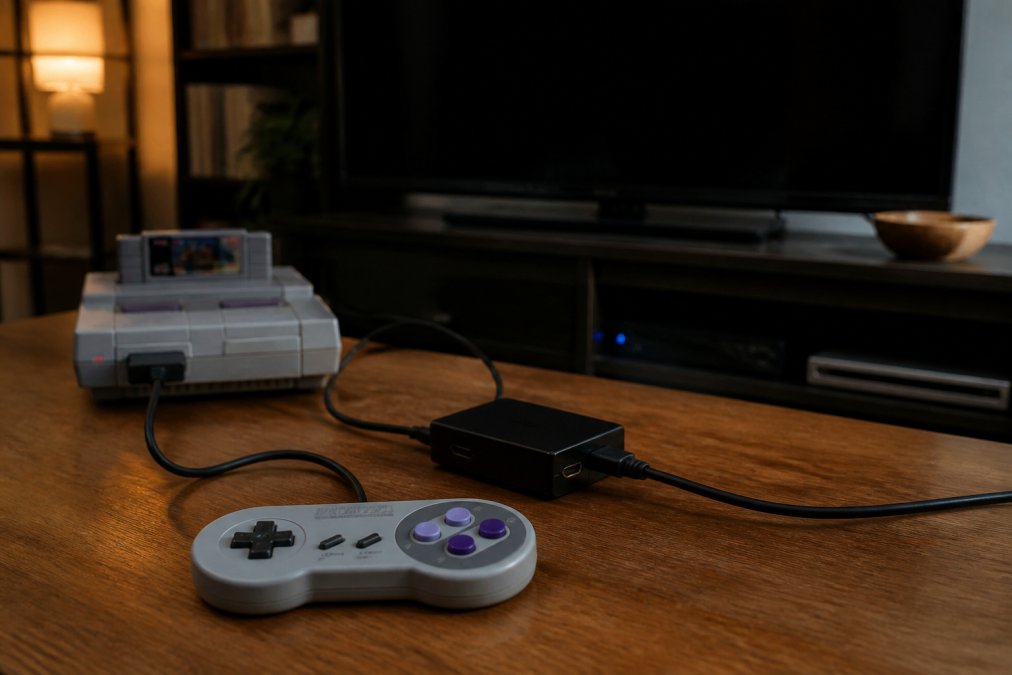
A retro gaming upscaler comparison comes down to four specs: latency, signal support, scaling method, and output resolution. Ignore marketing language about "enhancement" and focus on measurable factors.
The table below summarises how the leading alternatives stack up against each other on the specs that matter most.
| Device | Signal Inputs | Scaling Method | Latency | Best For |
|---|---|---|---|---|
| OSSC | RGB, Component, SCART | Line doubling (2x-5x) | Zero added lag | RGB-capable console owners |
| Analogue Pocket | Cartridge (handheld) | FPGA hardware emulation | Zero added lag | Handheld cartridge collectors |
| Miyoo Mini Plus | Software emulation | Internal scaling | Minimal | Portable, budget gaming |
| Anbernic RG35XX | Software emulation | Internal scaling | Minimal | Entry-level handheld play |
| Evercade EXP | Physical cartridges | Internal scaling | Minimal | Licensed physical media fans |
| Retroid Pocket 5 | Software emulation | Internal scaling | Low | Demanding 3D retro titles |
Latency and Frame Buffering
Latency, or input lag, is the delay between pressing a button and seeing the action on screen. For platformers and fighting games, even a single frame of lag can throw off your timing. The OSSC adds virtually zero latency through pure line doubling rather than storing frames (videogameperfection.com).
Devices using frame buffering for scanline effects inherently add at least one frame of delay (retrorgb.com). If competitive play matters, prioritise a zero-lag processor; for RPGs, a single frame is unlikely to bother you.
Signal Support: RGB, Component, and Composite
RGB and component video carry separate colour and sync signals, producing a sharp image. Composite and S-video combine signals into fewer wires, causing colour bleeding and reduced detail.
The OSSC supports RGB, component, and SCART inputs, making it the most flexible for European or Japanese consoles. Handheld devices like the Analogue Pocket bypass this by reading cartridges directly. Audit your collection's output cables before choosing, as a device lacking the right input is useless.
Best Retro Console Upscalers for Beginners
Many collectors simply want to plug in, switch on, and play. For that audience, the market splits into plug-and-play handhelds with HDMI output and traditional upscaler boxes requiring configuration. Knowing which camp you fall into saves money and frustration.
Plug-and-Play: Handhelds with HDMI Out
If you don't own original cartridges, a retro handheld with HDMI output is the lowest-friction option. The Anbernic RG35XX (around $95 AUD) and Miyoo Mini Plus (around $110 AUD) both offer HDMI-out, but differ in setup experience.
The RG35XX works acceptably out of the box, but its stock firmware is widely regarded as buggy. Most owners immediately flash GarlicOS or Batocera, which requires downloading an image, writing it to a microSD card with a tool like BalenaEtcher, and booting with the new card, a 20-minute task, but not zero-effort.
The Miyoo Mini Plus has a similar learning curve. Community-developed OnionOS is why most enthusiasts recommend it, adding game-switching without rebooting, better save-state management, and automatic box-art scraping. Neither device is truly 'out of the box' for the best experience.
Plug-and-Play: Dedicated HDMI Adapters
For collectors who own original consoles and want to connect them without learning about line doubling, a dedicated HDMI adapter is often better. Devices like the LevelHike HDMI Converter or Pound Technology HDMI Link cables are inexpensive (typically $30-$60 AUD) and require no configuration.
The trade-off is image quality. These adapters perform basic analogue-to-digital conversion without sophisticated scaling, so on a 4K display the image appears softer with slight lag, rarely a problem for casual RPGs, but noticeable in fast-paced platformers.
Tinker-Heavy: The OSSC Path
The OSSC is not a beginner device. It offers no default 'auto' mode; instead, you select an output profile (2x-5x line multiplication) and adjust sampling parameters to match your console's output timing. The learning curve is real, but the payoff is zero added latency and the sharpest image from original hardware.
If you're not willing to spend an afternoon tweaking settings, the OSSC is likely the wrong choice; if you enjoy tinkering, it's one of the most rewarding devices in the retro space.
A Practical Decision Framework
| Your Situation | Recommended Path | Setup Effort |
|---|---|---|
| Own original cartridges, want authentic hardware accuracy | Analogue Pocket + Dock | Low (plug and play) |
| Own original consoles with RGB output, willing to configure | OSSC | High (menu configuration) |
| Own original consoles with composite-only output | LevelHike or Pound adapter | Very low |
| No original hardware, just want to play classic libraries | Anbernic RG35XX or Miyoo Mini Plus | Medium (firmware flash recommended) |
FPGA Solutions: The Analogue Alternative
FPGA technology replicates original console hardware at the circuit level, producing cycle-accurate output that software emulation cannot match. The Analogue Pocket is the flagship example, using FPGA-based emulation for pixel-perfect playback of original handheld cartridges without software lag.
The trade-offs are availability and price. The Analogue Pocket sells for $340 AUD but frequently sells out, with waits of several months between order and delivery (analogue.co). For collectors with a substantial Game Boy library, the investment delivers the closest possible experience to original hardware on a modern screen.
Beyond the Pocket: The Wider FPGA Landscape
The Mister FPGA project is the most significant open-source alternative. It uses a DE10-Nano development board (around $350 AUD) with additional memory and I/O boards to emulate dozens of systems, from NES and SNES to Mega Drive, PC Engine, and arcade boards, with cycle-accurate precision.
Mister is not a consumer product in the traditional sense. You assemble components, download core files, and configure settings through a text-based menu. Setup is more involved than any commercial device, but for collectors with diverse libraries, Mister can be more cost-effective than buying individual FPGA consoles.
The Longevity Question: Firmware and Community Support
Collectors invest in hardware expecting it to last decades, which is where FPGA solutions diverge sharply from software emulation devices.
The Analogue Pocket receives periodic firmware updates, but Analogue has a history of slow release cycles. If Analogue discontinued the Pocket tomorrow, the device would still function but be frozen at its current firmware state, with no community path to update it.
The Mister project, by contrast, is community-driven. New cores and improvements are released regularly by independent developers. This doesn't guarantee longevity, projects can be abandoned, but Mister's distributed development makes it less vulnerable to a single company's commercial decisions.
A Note on Software Emulation Devices
Devices like the Anbernic RG35XX and Miyoo Mini Plus rely on software emulation, inherently less accurate than FPGA. They also depend on custom firmware projects maintained by small volunteer teams. If a developer stops maintaining firmware, the device stops improving. For budget devices this is acceptable; for a $340 AUD investment, it's worth asking whether you're buying into an ecosystem with a future.
How to Connect Retro Consoles to HDMI: A Practical Guide
Connecting a retro console to a modern HDMI display requires three components: the console, a signal converter or upscaler, and an HDMI cable. The quality of each link affects the final image.
Start by identifying your console's output options. A SNES or Mega Drive outputs composite by default, but with modification or the right cable, many consoles can output RGB. The OSSC excels here, accepting RGB and component inputs without added lag. For composite-only consoles, a simpler transcoder may suffice, though expect softer image quality.
Cable Quality and Signal Interference
The cable connecting your console to the upscaler matters more than most collectors realise. Poorly shielded cables can introduce interference, visible as banding, ghosting, or rolling lines.
Keep cable runs short and avoid running them parallel to power cables. If you experience display issues, test with a different cable before blaming the upscaler.
Regional Power and Signal Standards: What Australian Collectors Must Know
Australian collectors face two challenges: power supply compatibility and video signal standards. Japanese and North American consoles run on 100-120V power, while Australian mains supply is 230-240V. Plugging an unmodified import console directly into an Australian outlet risks serious damage.
You have two safe options: use a step-down transformer rated for the console's power draw, or replace the internal power supply with a unit designed for Australian mains. Additionally, PAL consoles output 50Hz video while NTSC consoles output 60Hz; check that any upscaler supports both refresh rates, and verify the region of any second-hand console before purchase.
Which Alternative Should You Pick?
For collectors with RGB-capable consoles who refuse to compromise on latency, the OSSC at $220 AUD is the clear winner. Its open-source firmware and customisable line-doubling modes reward technical users.
For handheld cartridge collectors, the Analogue Pocket at $340 AUD delivers unmatched FPGA accuracy, assuming you can secure one. The Evercade EXP at $230 AUD offers a legal, curated alternative using physical cartridges, though it cannot play original vintage cartridges. Budget-minded players will find the Anbernic RG35XX at $95 AUD and the Miyoo Mini Plus at $110 AUD deliver solid emulation for 8-bit and 16-bit libraries.
Conclusion
Choosing the best RetroTINK alternatives for collectors comes down to matching the device to your hardware, tolerance for setup complexity, and budget. The OSSC leads for RGB purists, the Analogue Pocket dominates handheld cartridge play, and budget handhelds serve casual collectors well. Verify power compatibility first and invest in quality cables.
The same principle of curating quality over quantity guides our work at Lost America Cool Classic Collectables. Just as a proper upscaler preserves the integrity of a classic game signal, we source vintage-inspired decor and classic memorabilia that retains authentic character rather than cheap reproductions. Explore our collection of neon signs, classic vehicle models, and nostalgic collectibles to complete your space.
Frequently Asked Questions
Why is the RetroTINK so expensive, and are the alternatives as good?
The RetroTINK 4K uses advanced FPGA technology and extensive research to deliver pixel-perfect scaling with zero lag. Its price reflects high-end components and ongoing firmware support. Alternatives like the OSSC offer similar zero-lag processing for a lower cost, but often require more technical setup and quality RGB cables. For collectors on a budget, the OSSC or a handheld like the Anbernic RG35XX provides excellent value without the premium price tag, though you may sacrifice some convenience.
What is the best RetroTINK alternative for playing original cartridges on a modern TV?
For original cartridges with zero lag, the OSSC is a strong alternative, converting RGB and component signals to HDMI for a sharp image. If you want a simpler, all-in-one solution, the Analogue Pocket with its docking station offers an FPGA-based experience for handheld games. For console games, a hardware modification or a dedicated upscaler is still necessary to connect to a modern display.
Is a dedicated upscaler necessary for retro consoles, or can I just use composite cables?
Modern TVs handle composite signals poorly, resulting in a blurry, soft image and noticeable input lag. A dedicated upscaler like the OSSC or RetroTINK converts the signal to a resolution your TV understands natively, producing a sharp image with minimal added latency. While composite cables work, they do not do justice to the visual fidelity of your classic games. An upscaler is the best way to experience retro gaming on a modern display.
What features should I look for in a retro gaming upscaler for my collection?
Prioritise low latency, ideally zero-lag processing without a frame buffer. Look for support for your console's best signal output, such as RGB or component video, and ensure it has an HDMI output. Consider scanline filters for a CRT emulation effect and check for regular firmware updates. For a beginner, plug-and-play options are easier, while advanced users may prefer a device like the OSSC for its customisable settings.
Finding the right equipment for your retro setup takes research, and the same care applies to sourcing authentic memorabilia. At Lost America Cool Classic Collectables, we curate vintage-inspired pieces that bring timeless charm to home bars, garages, and dens. Browse our selection of classic Americana decor and nostalgic collectibles to find pieces that match your personal aesthetic, with shipping options designed for Australian collectors. Shop now to see what we have in stock.